Real Piano For Pianists
- 3.8
- Rating
- 5.00M
- Installs
- Free
- Price
 Analysis by App-foxy
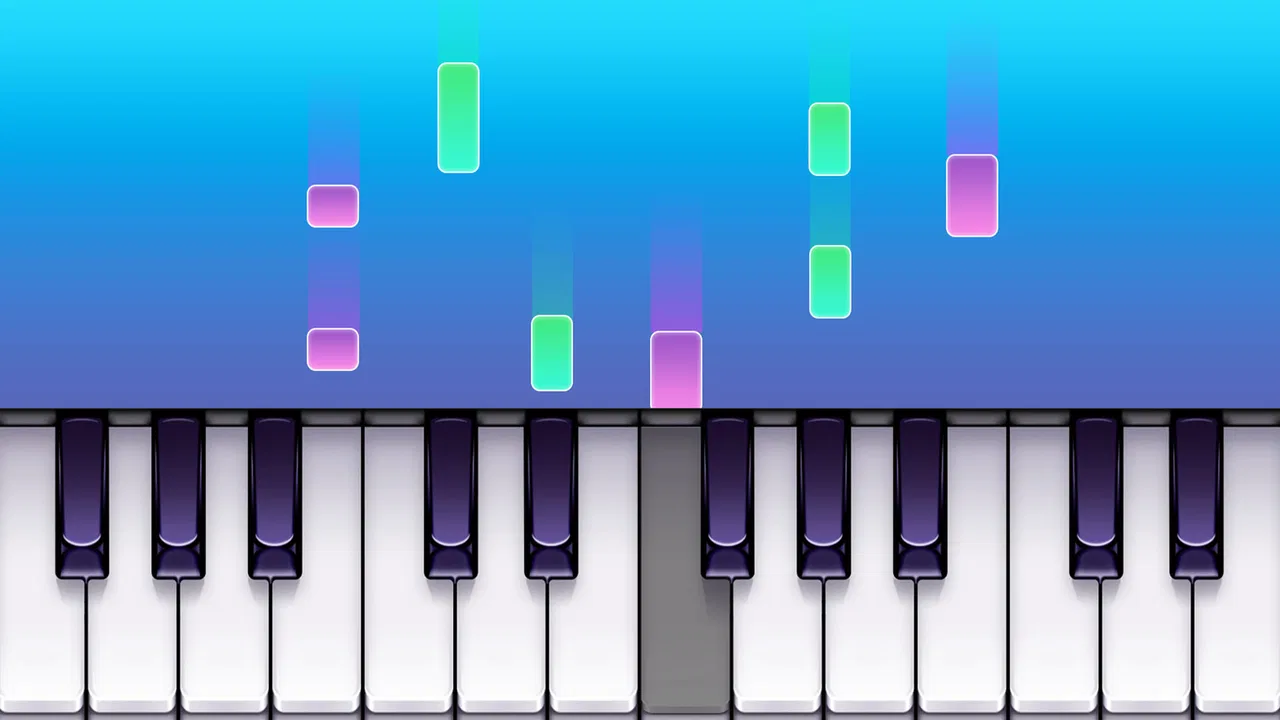
I spent time with Real Piano For Pianists as a casual music game, and my first impression was that it aims for a very direct experience: open it, see a piano, and start playing. The developer, RhythmMakers Studio, keeps the idea easy to understand. This is not presented as a full music-production workstation or a replacement for a physical instrument. It is a lightweight way to interact with piano keys on a mobile screen.
That simplicity is the main reason I can imagine recommending it to someone who wants a quick musical distraction. It fits the music category, carries an Everyone age rating, and can be tried without an upfront payment. At the same time, the name may set expectations that are higher than what a touchscreen can comfortably deliver. A phone or tablet can imitate the layout of a piano, but it cannot provide the same key resistance, spacing, or expressive control as a real keyboard.
How Real Piano For Pianists feels in everyday use
I find the everyday appeal of Real Piano For Pianists less in replacing a keyboard than in making a musical thought easy to test wherever I happen to be. That changes how I judge its controls: a layout that works for a quick note check may not suit a longer session, especially when the screen is small. The next section looks at how visual clarity and navigation shape that first interaction.
You May Also Like

 AccuWeather: Weather Radar
AccuWeather Review: A Quick, Clear Forecast for Everyday Decisions
For everyday plans, the best forecast is the one you can understand quickly. AccuWeather makes rain timing, radar, and local conditions easy to act on, with a few trade-offs.

 Hill Climb Racing
Why Hill Climb Racing Still Turns Crashes Into One More Run
A tiny car, a bumpy hill and one more upgrade: Hill Climb Racing keeps resurfacing because its simple chaos makes every near-miss feel personal.

 AliExpress - Shopping App
AliExpress Makes Global Shopping Feel Personal, but Shoppers Bear the Risk
AliExpress turns a global marketplace into a pocket-sized discovery engine. Its reach is useful, its shopping loop compelling, and its trade-offs easy to miss.

 Lords Mobile: Kingdom Wars
Lords Mobile Is a Kingdom-Building Routine, Not a Quick Match
A case-by-case verdict on the building, battles, device demands, and social commitments that make Lords Mobile rewarding for some players and exhausting for others.

 PDF Scanner app - TapScanner
TapScanner Makes Paperwork Easier to Capture, Check, and Share
TapScanner makes scanning with a phone feel less like a rescue operation and more like a dependable step in getting work done. Its capture tools are useful, though not flawless.

 Block Blast!
 Shows How Much a Puzzle Game Can Leave Out
A quiet grid game shows why puzzle players increasingly value instant clarity, repeatable skill and low-pressure play—and where the genre still needs to catch up.
More From Our News Desk
View All News


A straightforward starting point for casual playing
The game’s strongest quality is its immediate focus. I do not approach it like a traditional arcade title with a complicated objective. I approach it as a small musical space where I can tap keys, experiment with notes, and spend a few quiet minutes doing something more active than scrolling. That makes it suitable for beginners who want to become familiar with the visual arrangement of piano keys before committing to lessons or buying equipment.
A useful everyday scenario is a short practice break. If I have a melody in my head, I can use the on-screen keyboard to search for the opening notes instead of trying to remember them later. This kind of use is modest, but it is practical. The app can act as a pocket reference for basic note exploration, especially when carrying a physical keyboard is impossible.
I also see value for parents looking for a simple music-related activity that does not require a child to understand a complex interface. The Everyone rating makes the age positioning broad, although adults should still guide younger children toward sensible screen habits. The game is best treated as an introductory play tool rather than a complete musical education system.
What the free entry point really means
There is no upfront price to start using it, which lowers the risk for curious players. That matters here because a touchscreen piano is a very personal experience. Some people will enjoy tapping out notes immediately, while others will find the screen too cramped or the interaction too limited. Being able to try it first is more useful than being asked to pay before discovering whether the format suits your hands.
The purchase model is also clear enough to keep in mind: optional in-app items cost $4.99 each. I would not automatically treat that as a problem, but I would pause before buying anything. The free access is the part I can confidently evaluate as an entry point; the value of individual purchases depends on what a player wants from the extra content and how often they expect to use it. I would only spend money after confirming that the free experience has become part of my routine.
This distinction is important. A free download can be worthwhile even when a paid item is not. Someone who only wants occasional note exploration may receive all the value they need without paying. A more committed player may consider an item reasonable if it adds something they will use repeatedly, but I would judge that purchase by practical frequency rather than by the promise of becoming a better pianist automatically.
Why the phone matters more than the label
On a larger tablet, an on-screen piano has a better chance of feeling comfortable because the keys can be easier to see and reach. On a small phone, I would expect more compromises. Several fingers may cover the display, and accurate playing can become awkward when notes are close together. This is not a flaw unique to this game; it is the central trade-off of mobile piano apps.
My advice is to hold the device in a stable position and use short sessions at first. Trying to play quickly with both hands on a small screen can turn a pleasant experiment into a frustrating tapping exercise. A slower approach works better: find a few notes, repeat them, and pay attention to whether the layout feels natural before attempting anything ambitious.
Another useful habit is to use the app for ideas rather than judging yourself by performance. I would use it to identify a tune, test a simple sequence, or introduce a child to the shape of a keyboard. I would not make it my only method for developing timing, finger strength, or expressive technique. Those goals need more than a flat touchscreen can provide.
Small workflows that make it more useful
One of the better ways to use the game is as a “capture it now” tool. When a melody appears unexpectedly, I can work out a few notes immediately instead of humming into a recorder or hoping memory will preserve the idea. I would then write the notes down separately, because the app should not be treated as a guaranteed long-term composition archive unless that function is clearly available in the version being used.
A second workflow is deliberate ear training at a very basic level. I can choose a starting note, move upward or downward, and try to predict the next sound before tapping it. This does not turn the game into a formal lesson, but it makes idle use more purposeful. The key is to create a small challenge for myself instead of tapping randomly for a few seconds and closing the app.
A third tip is to compare the on-screen spacing with a real keyboard whenever possible. If I am learning the names and order of notes, I can use the mobile layout as a visual reminder, then check the same pattern on a physical instrument. That prevents me from mistaking familiarity with the display for genuine comfort at a piano.
What the public response suggests
The game has passed five million installs, so it has clearly reached a large audience for a mobile music title. Its average rating is 3.8 from around 3.4 thousand ratings, which reads to me as a mixed but reasonably positive reception rather than universal enthusiasm. I would interpret that as a reason to keep expectations measured: many players may find the basic idea useful, while others may want more depth or a smoother playing experience.
There are also 51 written reviews, giving prospective users some individual opinions to examine alongside the overall rating. I would focus on comments that match my own intended use. A person seeking a quick virtual keyboard may be satisfied by the same experience that disappoints someone expecting structured piano training. Ratings are most helpful when the reviewer’s goal resembles yours.
Where it sits beside other piano options
Compared with a physical keyboard, this game wins on portability and accessibility. I can carry a phone almost anywhere, open the app without setting up equipment, and explore a musical idea immediately. The physical instrument wins decisively for touch, spacing, volume control, and serious practice. If I already own a keyboard, I would use this game as a backup rather than a replacement.
Compared with formal piano-learning apps, Real Piano For Pianists appears more attractive to users who want an open-ended starting point instead of a lesson path. A structured learning service is usually the better choice for someone who needs guided exercises, progress tracking, or a clear curriculum. This game makes more sense when I want freedom and low commitment, particularly if I am still deciding whether piano deserves a larger place in my life.
Compared with a generic virtual instrument, its appeal comes from being framed as a game rather than a professional tool. That can make experimentation less intimidating. The trade-off is that a game-oriented experience may not satisfy musicians who need recording, detailed sound control, or production features. I would choose a dedicated music workstation for those tasks and keep this one for quick interaction.
Limitations I would consider before installing
The biggest limitation is the touchscreen itself. Even if the visual keyboard is clear, fingers do not receive the feedback they get from real keys. That makes repeated practice less physically informative. A beginner could learn the order of notes while still developing habits that do not transfer smoothly to an acoustic or electronic piano.
I would also be cautious about the word “pianists” in the name. Experienced players may find the mobile format too restricted for serious repertoire or expressive performance. The app can still be useful for checking an idea while away from a keyboard, but it is unlikely to replace a proper instrument for someone who already practices regularly.
The purchase structure deserves attention as well. Since each in-app item is priced at $4.99, small purchases can become meaningful if made impulsively. My approach would be to use the free version long enough to identify a specific need, then decide whether one item solves it. If I cannot name the repeated problem the purchase addresses, I would keep the free experience.
Device size is another practical issue. A tablet should be more comfortable for multi-finger interaction than a compact phone, but I would still test the layout rather than assume it will feel like a keyboard. Players with limited hand movement or vision may also need to assess the key spacing and display readability personally. The broad age rating does not guarantee that every device setup will be equally accessible.
Who will get the most from it
I think the best match is a curious beginner who wants a low-pressure way to explore piano notes. It also suits someone who occasionally invents melodies, a parent introducing basic keyboard ideas, or a casual player who enjoys music-themed interaction without buying hardware. The free starting point makes it easy to test those use cases without making a financial commitment.
It is less suitable for a learner who wants a complete course. If your main goal is to read notation, build disciplined technique, or follow a planned progression, I would look for a dedicated learning platform or an instructor. The same applies to a producer who needs reliable recording and sound-design tools. In those situations, the game’s simplicity becomes a limitation rather than a benefit.
It may also be the wrong choice for someone who dislikes touch controls. No amount of enthusiasm for the concept changes the fact that a screen feels different from a keybed. If you already know that tactile response is essential to your enjoyment, saving for a small physical keyboard would likely deliver better long-term value than paying for optional mobile items.
Compatibility and ongoing expectations
The app supports devices running Android 7.0 or later, which gives it a broad compatibility range across older and newer Android hardware. I would still consider the physical display when deciding where to install it. Operating-system compatibility tells me whether the software can run, but it does not tell me whether the screen will be comfortable for two-handed playing.
The current version is 8.0, and the game was released on October 24, 2022. Those details help place it in context: it is an established mobile title rather than something I would approach as a brand-new experiment. I would keep the app updated when possible, particularly if I depend on it for quick musical notes, but I would not assume that a version number alone means it offers the depth of a professional piano package.
RhythmMakers Studio has chosen a focused concept, and that focus is both its identity and its boundary. I appreciate not needing to treat a simple musical toy like a full studio. The right question is not whether it can replace every piano-related tool; it is whether a portable, free-to-start keyboard game has a place in my routine. For casual exploration, the answer can be yes.
My recommendation after weighing the value
I recommend trying Real Piano For Pianists if you want an accessible way to tap out melodies, learn the visual order of piano notes, or fill a few spare minutes with something musical. The no-cost entry point is its clearest value, and the Everyone rating makes it a reasonable option for broad household use. I would begin with short sessions and judge the experience on the device I actually plan to use.
I would not recommend paying immediately. The $4.99 price for each optional item should be considered only after the free experience proves useful in everyday life. If I use it once every few weeks, free access is probably enough. If I regularly return to it for melody sketches or beginner practice, a carefully chosen purchase may be easier to justify, provided it directly supports that routine.
My final view is positive but deliberately limited: this is a convenient mobile piano game, not a substitute for lessons, a physical keyboard, or professional music software. Its best contribution is lowering the barrier between an idea and a few playable notes. Try it for free, use it with realistic expectations, and spend only when a specific repeated need makes the upgrade worthwhile.
FAQs for Real Piano For Pianists
01What is Real Piano For Pianists?
Real Piano For Pianists is a mobile piano simulator designed for users who want to practice, play, or experiment with piano sounds on an Android or iOS device. It provides an on-screen keyboard with playable notes and typically includes features aimed at beginners, casual players, and more experienced pianists. The app is useful for basic practice, learning melodies, and enjoying piano-style playing without owning a physical instrument.
02Can beginners use Real Piano For Pianists to learn piano?
Yes, beginners can use Real Piano For Pianists as an accessible introduction to piano keys, note positions, and simple melodies. The app can help users become familiar with the keyboard layout and develop basic finger coordination. However, it should not be considered a complete replacement for a teacher or structured piano course, especially for learning posture, technique, rhythm accuracy, and advanced music theory.
03Does Real Piano For Pianists work without an internet connection?
Many of the core piano-playing functions can generally be used offline after the application has been installed, which makes it convenient for practicing while traveling or in areas with limited connectivity. Some additional content, advertisements, updates, or online features may require an internet connection. Availability can vary depending on the version and device, so users should check the app’s current store description before downloading.
04Is Real Piano For Pianists free to download and use?
Real Piano For Pianists may be available as a free download, but users should review the store listing carefully because free applications can include advertisements, optional purchases, or premium features. The basic piano experience may be accessible without payment, while extra sounds, lessons, customization tools, or an ad-free experience could require a purchase. Always check the pricing details shown for your region.
05Does the app provide realistic piano sound and responsive controls?
Real Piano For Pianists is intended to reproduce the experience of playing a piano through a touchscreen, with notes triggered by tapping the virtual keys. Its realism depends on your device’s speakers or headphones, screen size, audio quality, and the app version installed. It can be enjoyable for casual playing and practice, although touchscreen controls and possible audio delay may not match the precision of a real piano or professional MIDI keyboard.
Pros
- Responsive touch controls make practicing scales and chords feel natural.
- Includes multiple piano sounds for varied practice and performance styles.
- Useful for learning notes
- chords
- and basic keyboard layouts anywhere.
- Works well with headphones for quiet practice sessions.
- Simple interface makes it easy to start playing without lengthy setup.
Cons
- The small on-screen keys can be difficult to play accurately on phones.
- Advanced players may find the available features and sounds limited.
- Some features or instruments may require in-app purchases or ads.
- Playing quickly can cause occasional missed or delayed touch inputs.
- A virtual keyboard cannot fully reproduce the feel of weighted piano keys.

Real Piano For Pianists
Gallery